The New Soundtrap: All The Power, None Of The Friction
Feb 17, 2026
-
Tero Potila
In my almost 20 years of working as a producer, composer, and songwriter, I’ve seen the same story play out a thousand times. A creator has a brilliant idea—a melody that could be a hit or a lyric that feels just right. But by the time they’ve figured out their software, the vibe has left the room.
I was recently invited to test the new Soundtrap, and it feels like a refreshing, necessary pivot. Think of what Canva and CapCut did for design and video.
Soundtrap is doing the same for music, bringing creation to the cloud, and making it collaborative, powerful, and without the friction.
Modern creators don’t need more complexity, they need speed. They need tools that serve their creativity, not slow it down.
The new Soundtrap is built around exactly that philosophy.
Power Without the Friction
Professional music production has historically demanded a steep toll: heavyweight setups, long learning curves, expensive plugin bundles. The new Soundtrap breaks that trade-off.
You get a studio packed with effects, instruments, and real-time collaboration, without any of the overhead that usually comes with it.
This is a more serious work environment that stays out of your way. It’s built for creators who want to move at the speed of ideas and release music that sounds like it came from a professional studio.
More Automation: Your Most Requested Feature
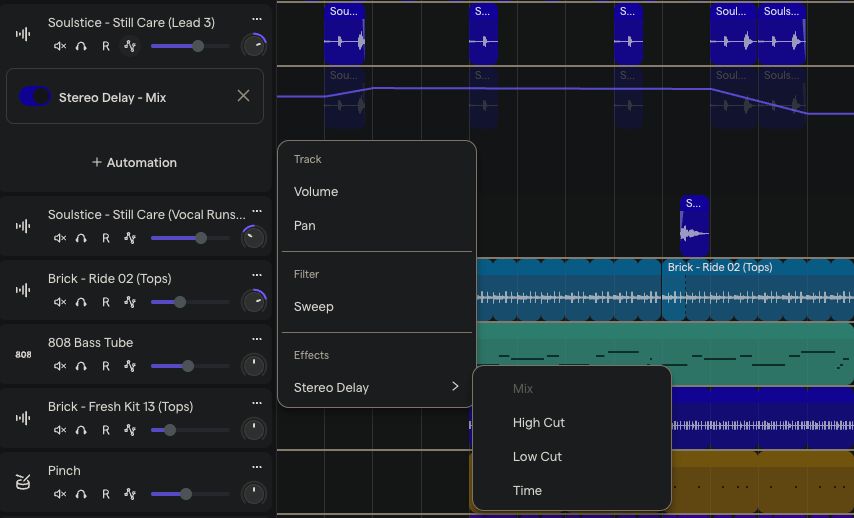
Soundtrap 2.0 now features the ability to automate almost every effect.
The biggest creative leap in the new Soundtrap is the introduction of automation across almost every effect. Professional records breathe and move.
Automation is what separates a static demo from a track that feels alive, and it’s now fully integrated into the workflow.
You can now shape your sound dynamically:
- Creative Textures: Use Bitcrusher, Phaser, and Pitch Shifter to evolve a sound over time rather than letting it sit flat.
- Space and Depth: Automate ReverbPro and StereoDelay to build emotional tension and create washes that lift a song.
- Dynamic Movement: Smoothly adjust Volume, Pan, and Filter sweeps to keep the listener locked in throughout.
The controls are intuitive and immediately familiar to anyone who has worked in a DAW. I was automating effect parameters and getting creative within minutes; no documentation, no tutorial.
Download the Desktop App: Low Latency, No Limits
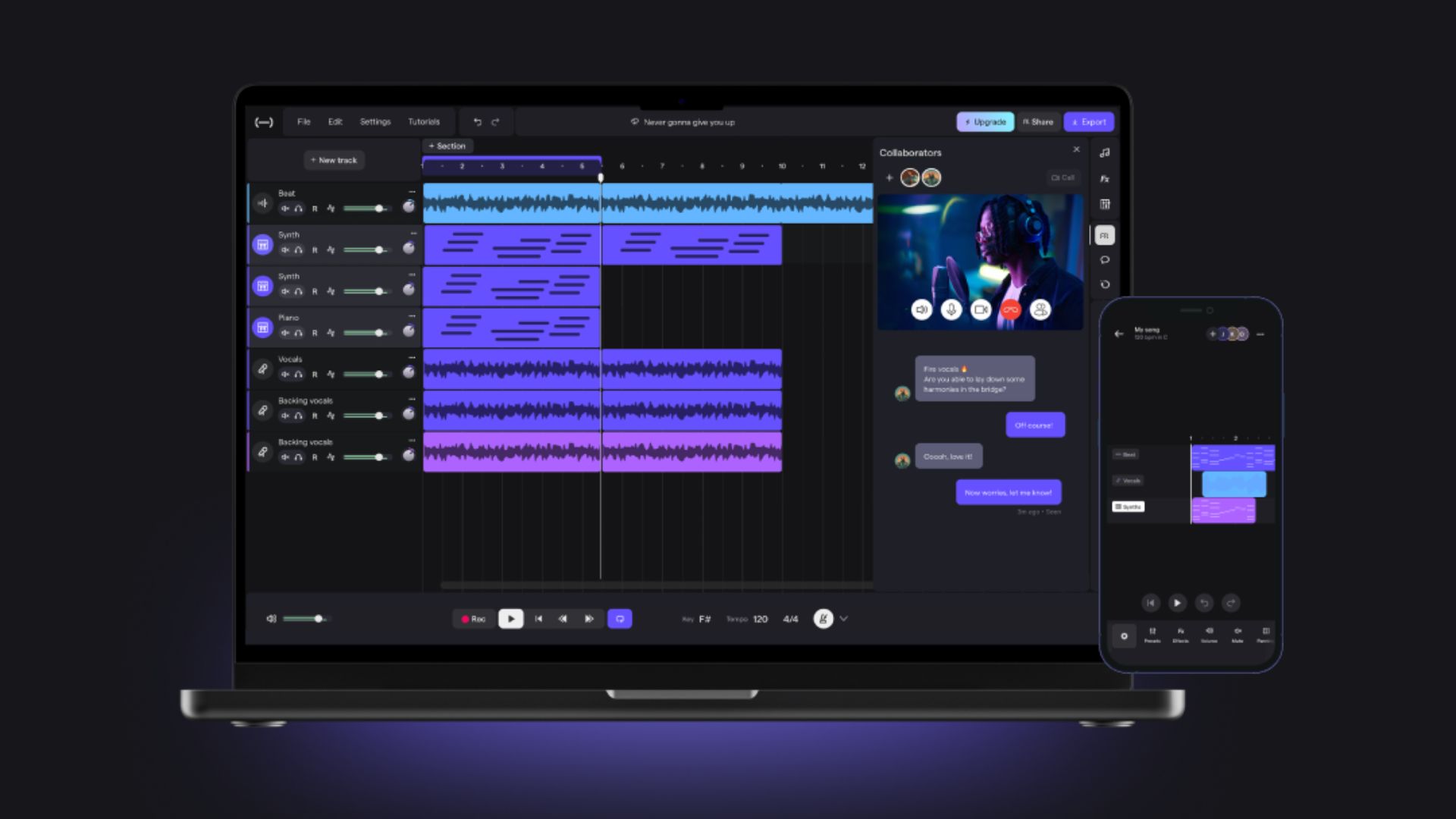
If you’ve ever tried to record a vocal and heard your own voice back a split second late, you know the frustration of latency.
The new Soundtrap solves this with a downloadable desktop app. It’s currently available for Mac, with Windows coming soon.
The app automatically syncs in real time with the web version. There’s no track limits and you get lower latency for recording vocals and live instruments.
It was easy to install and immediately let me record with the kind of responsiveness that used to require a full local DAW setup.
You don’t have to use it, but when you’re recording a performance, it’s there, and it works exactly as it should.
Listen Anywhere: The Refreshed Mobile App
One of my favourite habits when checking a mix is testing it in the real world: on car speakers, phone speakers, and earbuds.
The new Soundtrap makes this seamless with a mobile listening app for iOS and Android, rebuilt from the ground up.
It’s not just a file player. It’s a refined playback experience that keeps you connected to your tracks wherever you are.
No uploading to cloud storage, no emailing files to yourself. You finish a mix, and you’re already listening to it in the real world.
A Studio Built to Keep You in the Flow
The entire studio interface has been refreshed. It’s cleaner, faster, and designed to keep you inspired and not distracted.
What I immediately liked the most about the interface is that all the most powerful tools are immediately accessible, and the starting point is built for creative momentum rather than configuration.
In addition to professional processing tools with full automation, the studio includes a massive built-in sample library, helpful presets, and real-time collaboration with built-in video calling.
You get everything you need without having to piece together a separate plugin stack.
I know from my personal experience how important momentum is when you’re in the creative flow; it’s your most valuable currency. The longer it takes to set up, the more likely the idea is to disappear before you’ve captured it.
The new Soundtrap respects that. It’s set up so you can move at the speed of thought.
Just Getting Started
The full marketing launch is here on March 4th, with the launch period running through March 11th. But this feels less like a product launch and more like a new chapter.
Soundtrap is built alongside the people who use it. The team has been listening to your requests for more automation, for lower latency, for a studio that doesn’t compromise on power while still removing every unnecessary barrier.
And they’re promising to keep going: more power, less friction, with the process of making music always at the centre.
If you’ve been with Soundtrap for a while, this is the evolution you’ve been waiting for. If you’re arriving now, you’ve joined at exactly the right time.
Conclusion
The new Soundtrap is slicker, faster, and more capable than any previous version.
If you’ve been held back by tools that slow you down, or simply want a professional studio that works on your terms, I recommend you check it out.
The gap between your idea and a finished, high-quality track has never been smaller.
Frequently Asked Questions
What is new in the latest Soundtrap update?
The new Soundtrap introduces a fully refreshed studio interface, a downloadable desktop app for Mac (Windows coming soon), automation across almost every effect, and a rebuilt mobile listening app for iOS and Android.
When is the new Soundtrap available?
The full marketing launch is March 4th, with the primary launch period running through March 11th.
Does the new Soundtrap support automation for effects?
Yes, automation is now available across a wide range of effects including ReverbPro, Bitcrusher, Delay, Filter, and Pitch Shifter—giving creators full dynamic control over their sound.
Why should I use the Soundtrap Desktop App?
The desktop app provides low-latency recording for vocals and live instruments, with no track limits. It syncs automatically in real time with the web version—currently available on Mac, with Windows coming soon.
Can I listen to my Soundtrap projects on my phone?
Yes. The new mobile listening app for iOS and Android—rebuilt from the ground up—gives you a refined playback experience so you can check your work anywhere, instantly.
About the author
Tero Potila is a professional music composer and producer. His career combining knowledge and experience from music, TV, film, ad, and game industries gives him a unique perspective that he shares through posts on teropotila.com.