
How To Make Lo-fi Music: A Step-By-Step Beat Guide
Sep 20, 2023
-
Tero Potila
You already know the sound: that dusty, warm vibe behind a rap verse, the crackle under a chill beat. Making lofi music yourself is easy with modern tools, and you don't need a studio full of gear to get started.
I’ve spent a lot of time working in different production styles throughout my career. One of my favorite aspects of producing the lofi genre of music is definitely the fact that it rewards feeling and vibe over technical perfection.
It’s less about pristine audio and more about building a cozy, immersive atmosphere.
The most important thing when making lo-fi music is to trust your ears and create a vibe, not a perfect, clean sound.
What is Lo-fi Music and Its Subgenres?
At its core, lofi music (short for “low fidelity”) is a genre built on imperfection.
Originally, the term lofi described recordings with audible hiss, tape noise, or dropped frequencies; the kind of “flaws” that would usually be fixed in a polished pop mix.
Producers turned that low fidelity into a deliberate style choice.
Today, it’s one of the most recognizable musical styles around, instantly tied to lo-fi hip-hop beats, chill study playlists, and the endless background streams that have introduced millions of listeners to the genre.
What makes a track truly lo-fi?
One of the genre’s most distinctive features is a slower tempo. The BPM (beats per minute) of lo-fi songs usually sits around 60 to 85 BPM, giving the track room to breathe.
It’s a sound that embraces a vintage feel and instruments, soothing melodies, cloudy soundscapes, and intentional audio artifacts.
Since its origins in the ’90s hip-hop scene, lo-fi beats have taken center stage, branching out into a few distinct subgenres:
- Chillpop: The modern offspring of lo-fi hip-hop. It combines mellow, downtempo beats with samples from jazz or soul to create a relaxed, groovy ambiance.
- Vaporwave: Characterized by nostalgic references to ’80s and ’90s pop culture, it typically features slowed-down, pitch-shifted, and reverb-drenched samples of smooth jazz, lounge, and pop music.
- Ambient Lo-fi: Prioritizes soothing and ethereal soundscapes, using soft synthesizers, nature sounds, and minimalistic beats for meditation and relaxation.
- Lo-fi House: Takes the cozy, unpolished aesthetic of lo-fi and infuses it with the infectious, danceable rhythms of house music.
Build the Core of Your First Beat
When you’re getting started on your first lo-fi beat, focus on incorporating these core elements: A slow drum pattern, a jazzy chord progression, a simple melody, and a bass line to hold it down.
What Tools Do You Need to Get Started?
1. A Digital Audio Workstation (DAW)
A DAW is the one thing you truly need. One great option for your productions is Soundtrap. It includes everything you need and works right in your browser.
With built-in virtual instruments, drum samples, and mixing tools, you don’t need expensive plugins to get that dusty sound.
2. Studio Monitors or Headphones
Good-quality studio monitors are great, but you can start with headphones. Once your productions get more advanced, you can consider investing in better speakers.
3. A MIDI Controller
A MIDI controller is optional, but it definitely makes entering piano chords and melodies far more intuitive than clicking with a mouse. I highly recommend investing in one if you don’t have one yet.
4. Choosing the Sounds
What matters more is picking the right sounds: Think warm electric piano tones, dusty acoustic drum kits, and a few textured one-shots to build around.
Choose a Slow Tempo and Relaxed Drum Groove
The next step is to set your project tempo somewhere between 60 and 85 BPM.
In my experience, right around 80 BPM is the sweet spot for that signature boom-bap, laid-back groove.
Start by laying down the foundation. If you’re working in Soundtrap, open up the Patterns Beatmaker and choose a drum kit that fits the genre, like the “Lofi Kit”, “90s Rnb”, or “Vintage Kit”.
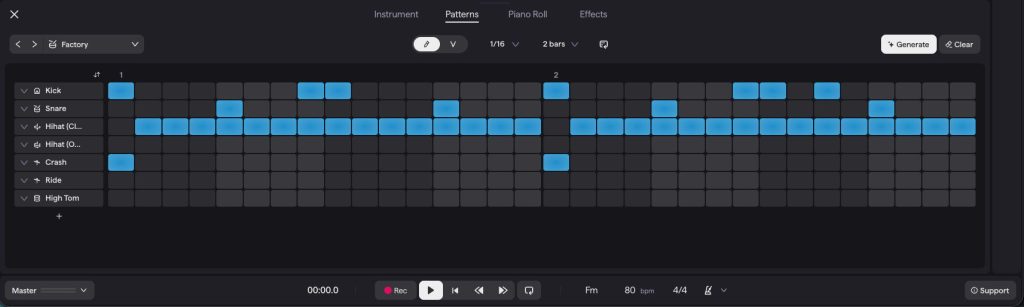
My Pro Beat-making Tip: Build a classic 2-bar boom-bap drum pattern (8 beats total).
Place your snare on beats 2, 4, 6, and 8 for a steady backbeat. Position your kick drum on beat 1 and beat 3.5 (the “and” of 3), with a second kick on beat 5 to create a relaxed, syncopated groove.
Fill in eighth-note closed hi-hats across the grid.
Find Your Lo-fi Instruments, Chords, and Melodies
Retro-sounding instruments really make up the lo-fi vibe. Common choices include vintage keyboards like a Rhodes or Wurlitzer, warm analog synths, and dusty guitar strings.
You don’t necessarily need to understand deep music theory to write convincing lofi chords, but understanding some of the basics is very helpful.
Here are some tips for getting you going fast on your own lofi beat:
- Start with Minor 7th and Minor 9th chords (four- and five-note chords with a moody, melancholic feel). They form the backbone of classic lo-fi chord progressions, though Major 7th chords are often mixed in for warmer, brighter moments.
- Try a simple two- or four-chord loop using an electric piano sound.
- Once that loop feels good, layer in a simple melody on top.
- Finally, add a bass line, keeping it locked to the root notes of your chords so the low end stays solid and unfussy.
Flip a Sample or Use Premade Loops
If you don’t feel like playing your own instruments, you can choose a sample that fits the mood. It could be a snippet from an old jazz record, a vocal line from a vintage movie, or any sound you find interesting.
If you’re looking for quick inspiration, try exploring Soundtrap’s vast loop library. Search for terms like “90s”, “lo-fi”, or “vintage”.
Here are some of my favorite Lo-fi Soundtrap samples packs:

Soundtrap

Soundtrap

Soundtrap
Pro Tip: I recommend using samples from other styles not made directly for Lo-fi as authentic sampling material, like acoustic drum textures, guitar layers, and analog noise to add warmth.
With over 25,000 loops and samples available, you can drag a premade loop directly into your studio over your drum beat, and it will automatically match your BPM and song key.
Arrange a Listen-Friendly Track
Song structure in lofi tracks tends to be loose, but you still need variation. A beat shouldn’t just be a loop on repeat for three minutes.
Start by producing your “core section”, where every instrument and element plays together. From there, you can subtract elements to build your arrangement:
- Intro: Set the mood with vinyl crackle and your main chords.
- Verse / Main Loop: Bring in the drum groove and bass.
- Chorus: Introduce your top melody here to make the beat more captivating.
- Bridge: Break things off by dropping the drums or adding a unique vocal sample.
- Outro: Let the beat slowly fade into ambient atmosphere.
That’s typically the minimum structure you need.
However, if you’re working on lofi hip hop beats, for example, then I’d take this further and follow a more commonly used full song structure with a second verse and second chorus before the bridge, and a final chorus after the bridge before ending the song with the outro.
Create the Warm, Imperfect Lo-Fi Finish
The lofi sound comes from layering subtle imperfections onto a clean recording, not from making the track sound broken.
Apply Lo-fi Mixing Effects
- Use a Low-pass Filter: A low-pass filter is the fastest way to soften a mix, as it rolls off high frequencies and removes the crisp, digital edge of modern production. Cutting high-end information gradually keeps the track sounding warm instead of muffled.
- Add Vintage Grit with a Bitcrusher: Lo-fi gets its name from lowered digital fidelity. Adding a Bitcrusher effect reduces the bit depth and sample rate of your synths or drums, bringing subtle digital crunch and vintage warmth similar to classic 90s hardware samplers.
To achieve that signature sound in the Soundtrap studio, add effects like Overdrive, Delay, and Bitcrusher to your instrument tracks.
Gentle Vibrato and Chorus effects are great for adding subtle pitch movement to sustained chords, mimicking the flutter of an old tape machine without pulling the track out of tune.
The Tape Wobble effect in Soundtrap is also an amazing, readily available Soundtrap effect that fits in well with the lo-fi sound. - Create Space with Sidechain Ducking: To give your beat that signature “pumping” feel, use sidechain compression or volume automation on your chords and pads.
By dipping the volume of your keys slightly every time the kick drum hits, you keep the low end punchy while giving the entire track a gentle, rhythmic breathing motion.
Add Vinyl Texture and Ambient Sound FX
Vinyl crackle and background noise should sit quietly behind your mix. A low-volume layer of vinyl noise, mixed just under your drums, gives you that “old record” feel.
To add some depth and atmosphere, try incorporating ambient sound effects like rain, birdsong, or street noise.
These subtle background elements enhance the immersive quality of your tracks and can help your music connect with listeners.
Humanize the Groove With Timing and Velocity
My Pro Tip: Perfectly quantized MIDI is the fastest way to make a lofi beat feel stiff.
As I often stress when programming MIDI, injecting a human feel is essential in any style, but it’s especially true with lofi beats.
- Apply Swing to Your Drums: Before manually moving notes, use Soundtrap’s Quantize menu to dial in a Swing setting (around 50%–60%). Swing slightly delays every second note in the grid, instantly turning a stiff digital drum pattern into a relaxed, organic groove.
- Manual Timing Adjustments: Nudge a few notes slightly off the grid (by 5-15ms) to simulate human imperfection.
I recommend looping a section of your track and finding the notes to nudge that give the track that special vibe. Sometimes it’s having the snare hit just a touch late, or a keyboard playing with a slower, nostalgic feel, rather than machine precision. - Varying the Velocity: Varying the velocity (how hard each note “hits”) between notes is another great tool; it can help bring subtle changes that mimic a real musician’s timing. Alternating velocity on your hi-hats or chord stabs is another good idea. It goes a long way toward making the track feel played rather than programmed.
Using these humanizing techniques gives your lo-fi tracks a solid foundation for making them your own.
Conclusion
Making your first lofi beat comes down to a simple sequence: lay down a relaxed drum loop, write a jazzy chord progression, add a melody that fits the vibe, and then finish with vinyl texture, tape effects, and a bit of human imperfection.
None of the steps we covered require advanced music theory knowledge or expensive gear.
Just a DAW, some good samples, and a willingness to experiment are enough to start producing your own lofi songs.
The real beauty of lofi music production is that you can develop your own balance of warmth, noise, and clarity over time, and so my advice is this:
Keep building and tweaking every little detail, and trust your instincts.
You’ll eventually develop a signature sound that your listeners will recognize.
About the author
Tero Potila is a professional music composer and producer. His career combining knowledge and experience from music, TV, film, ad, and game industries gives him a unique perspective that he shares through posts on teropotila.com.


